Showing posts with label part. Show all posts
Showing posts with label part. Show all posts
Tuesday, April 11, 2017
Part One A Hotel in Ireland
Part One A Hotel in Ireland
A reminder – “Segreto Vignettes” – Leslie’s brand new book is available for preorder. HERE
Part One: When you finish reading this story – read Part Two by clicking on the “Older Posts” button at the end of the page.

Last week, celebrity designer Martyn Lawrence Bullard took time off from decorating all the Kardashians mac mansions to attend a wedding in Bath. England. He then jetted over to Ireland for a stay at the most luxurious hotel – the Ballyfin Demesne. Lucky fellow. I mean, decorating for all those Kardashians!!!!

Seriously, imagine how much fun a decorator can have when Khloe and Kourtney and Kendall and Kylie are all klients? I konfess, I’m a fan.
But, I digress.
I’m not stalking Martyn’s vacation plans this summer. Of course not! He posted all the pictures of his days off on his very public Instagram and when he publicizes photos of his hotel suite at the Ballyfin – you can’t help but sit up and take notice. It’s a gorgeous room.

I’ve been lusting over the Ballyfin since it opened in 2011 and I’ll probably never get to check it off my bucket list, so, inspired by Martyn Lawrence Bullard, I thought we’d all tour the Irish hotel together! It’s been called the most gorgeous, the most luxurious, the most incredible, the most cozy place to stay in all of Ireland and I think you will agree.
The Ballyfin Demesne, once a country house, is now a hotel with just 20 rooms. During your stay there, all you have to worry about are the guests in the other 19 rooms who might disturb your fantasies that you are actually the lady of the house ala Downton Abbey.

The Ballyfin Demesne strives hard to make its guests feel at home, as opposed to feeling like they are staying at a hotel. They have been very successful in this approach that permeates every aspect of their management style. It’s hard to leave the Ballyfin and return to reality. Many who come are either repeat visitors, or they want to be. This much respected hotel has a very well-deserved good reputation.

And, speaking of the Kardashians, Kanye and Kim are rumored to have spent part of their honeymoon at Ballyfin. The list of stars who have been guests is of course not publicized. The hotel expected that most visitors would be from the stars from the states, but to the surprise of the owners, Americans are not the only guests, the Irish are also filling up the rooms.

Once I started researching this hotel – I realized that the story is not only about what it is today – but what this building once was – which is a family house. A big, beautiful family house, to be sure, but still – a family house that became a boarding school and then slowly deteriorated over the years.The story of this house, its incredible 8 year restoration and how it was saved to become a 5 star hotel is what makes it all the more interesting.

Ballyfin DemasneThe lands of the estate were once known simply as Bally-fin which mean “town of Fionn” - named after one of its earliest known inhabitant, Fionn Mac Cumhaill the leader of the Fianna (don’t ask me!)
Demesne means “land attached to a manor.” In Ireland, usually an estate, or a demesne (pronounced da-maine,) will have some sort of fence that marks its boundaries. At Ballyfin, its ancient stone walls still surround parts of the estate.
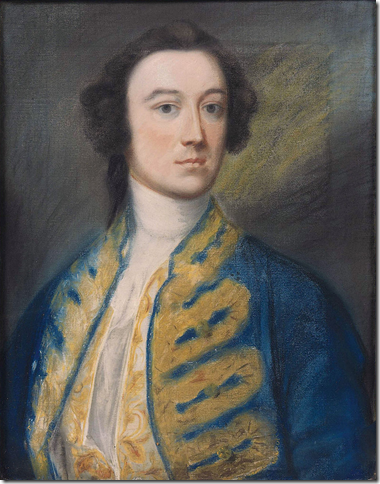
The 614 acre Ballyfin Demesne located in County Laois,was owned by a succession of families, including the Poles. Above is William Pole, who with his wife Sarah, created the lake and the much heralded natural landscape both still so important to the beauty of Ballyfin today. William and Sarah also extended the house that they had inherited from his uncle, another William. That house had been built in 1720, replacing an old Tudor castle previously there.
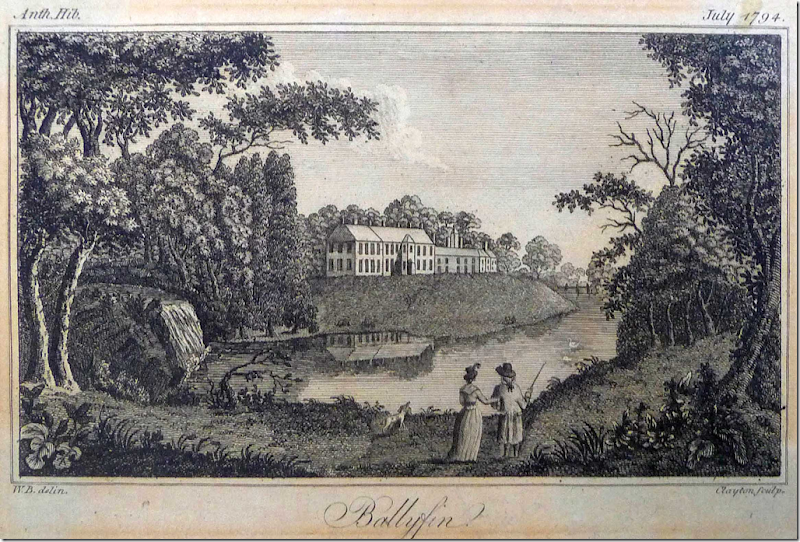
Above, in 1794, the house the Poles built at Ballyfin, is seen from across the lake. This house was torn down to make room for the present mansion.
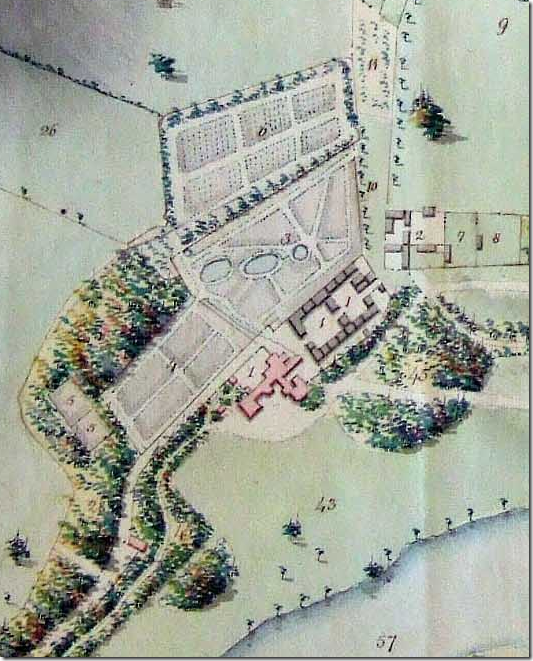
This map from early 1800s shows the original Pole mansion in pink, with the stables and farm buildings behind it. Read about the map HERE.
Later, it was another Pole, William Wellesley-Pole, who sold the Ballyfin estate to the Coote family. It was Sir Charles Coote who demolished the Pole’s house and built the grand house that is still standing today. The site of this new house was moved 200 ft to the west of the Pole’s house, away from the stable blocks.

Sir Charles Henry Coote, the first Coote to live on Ballyfin and the one who built the house that still stands today. He paid for the lavish house with part of his inheritance including the profits from the sale of a town that he owned. Sir Charles was considered one of the richest men in Ireland, along with being one of its largest landowner.

These are the plans for the current house at Ballyfin. The Regency house was designed by father and son Irish architects Sir Richard and William Morrison, who in 1820 were hired by Sir Charles Coote. The house the Morrisons designed is considered one the most important examples of 19th century neo-classical architecture in Ireland. It has a 13 bay facade which is broken by a portico with giant Ionic columns.

The side elevation – shows the Library - which runs the entire width of the house from front to back. The bay window is the central part of the Library, which is divided into three bays.

The house is quite large, it originally measured 35,000 sq. feet. It has two stories, with a basement and a mezzanine level.

The Coote Family owned the Ballyfin estate for 100 years, where they lived in genteel luxury, as evidenced by the numerous photos of the family at play.
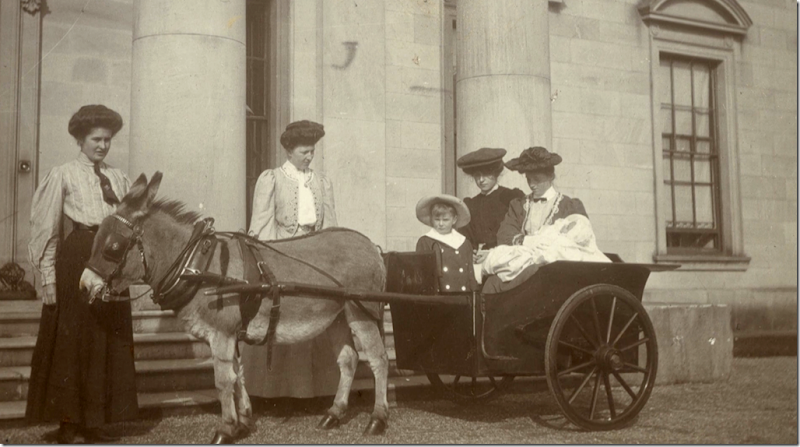
At the front entrance of Ballyfin in the late 1800s. The nannies with their charges as the mothers look on.

With the coming of Ireland’s Independence, money became an issue for the large landowners, and the Cootes were no exception.
They sold their house to the Patrician Brothers in 1920 for just 10,000 pounds. The Brothers then turned the estate into a popular, but austere boarding school for nearby boys. In 1928, the Brothers added a dormitory onto the back of the house, where the students lived.

The estate proved too expensive for the Patrician Brothers to keep it in good condition and it gradually fell into great disrepair. Meanwhile, a couple from Chicago – Fred Krehbiel, a billionaire, and his Irish wife Kay who hails from County Kerry - wanted to find a grand house in Ireland and turn it into a small hotel. They partnered with Landscape Designer and historian Jim Reynolds, who approached the Brothers with a proposal to buy the estate. The Brothers agreed, and the sale was brokered – with the provision that the school would stay open until the final class graduated.
The restoration was a huge endeavor and very expensive, there are estimates that it cost over $60 million. It looks it too – when you see all the chandeliers and fine art and antiques inside! The owners don’t expect to ever get their investment back. It’s a labor of love to them.

The story of Fred and his wife Kay and how the Chicago couple came to own this Irish estate is very interesting. Krehbiel, in his 70s, is considered a Renaissance man, intensely interested in the fine arts, antiques, silver, porcelains – and more, especially when the finery is Irish. His fascination with large houses began as a young man when he visited a classmate’s relatives during graduate school in England. The house he stayed in had 60 rooms, but the family only lived in five, typical of the cash strapped aristocracy.
Krehbiel recalls that visit: “It was an immense pile, like Ballyfin, and I had seen pictures and movies and all, but I hadn’t really experienced it. They were not living so grandly. They were trying to hold it together, but it was fascinating to see.”
Having been bit by the old mansion bug, Krehbiel spent his life harboring a dream of turning an old house into a boutique hotel. Ballyfin Demasne fit the bill.
Now that they are hoteliers, the Krehbiels spend a week each month in Ireland while the rest of the time they are at home in Chicago. Most interesting is that they don’t live at Ballyfin – their own house in Ireland is actually 2 1/2 hours away!! I would love to see THAT house!

BEFORE: This shows the estate after it became a boarding school. There is the original house and the taller dormitory that the Brothers built behind the house for the students. Later, during the restoration – the top floor of the dormitory was taken off so that the house and the dorm were the same height as opposed to having the dorm looming over the house as it once did.

BEFORE: The view from the opposite side. The large double quadrangle farm buildings behind the dorm were turned into schoolrooms for the boys.

TODAY: Here you can see that the mansion and the dorm are now the same height. Originally there were 15 hotel rooms, all but one, located in the mansion. Last year, five more rooms were added – in the old dormitory. Also in the old dorm is the indoor swimming pool and the ballroom.

DURING: In order to renovate the mansion and estate, a major restoration was undertaken, which lasted over eight years - longer than it took to build the original house. First, the roof needed to be completely fixed in order to stop the leaks which had already caused much damage and dry rot to the house. A temporary roof was built over the original roof while it was repaired.

Another early issue was the stone facade which was crumbling. Between repairing the roof and the facade – these jobs alone took over two years.

BEFORE: The conservatory, which was built for the Coots family in 1855 by Richard Turner, was also in total disrepair. It had to be dismantled piece by piece and sent to England to be repaired. The Conservatory was part of the original plan by Architects Morrison, but for some reason, it was put on hold and not built until years later.

During: The Patrician Brothers took great pride in Ballyfin and tried very hard to keep the estate in good condition – but with their meager bank account, it was an impossible task. In the end it was a blessing that the Cootes sold the house to the Brothers. They kept it as it was and made very little changes to the house itself – which was a godsend to new owners.
Available link for download

Monday, April 10, 2017
Saturday, April 8, 2017
Friday, April 7, 2017
Saturday, April 1, 2017
Patlu and his Ideas Compilation Part 2
Patlu and his Ideas Compilation Part 2
Out of hunger when Motu does not use his brain, Watch how Patlu comes up with smart ideas!!
Click - Like , Share , SUBSCRIBE for more!
Watch more Motu Patlu Videos here:
https://www.youtube.com/wowkidztv
For more updates Like us on Facebook:
https://www.facebook.com/WowKidzTV
Follow Wow Kidz on Twitter:
www.twitter.com/WowkidzTV
Follow Wow Kidz on Instagram :
https://www.instagram.com/wowkidztv/
Available link for download
PCI DSS and Red Hat Enterprise Linux Part 8
PCI DSS and Red Hat Enterprise Linux Part 8

Requirement 10: Track and monitor all access to network resources and cardholder data
Abstract
Technically implemented requirements given in this chapter refer to the syslog server, the kernel-level audit system auditd, NTP server settings, and an integrity control system. There are almost no analogous items in CIS standards.
10.2 Through interviews, examination of audit logs, and examination of audit log settings, perform the following.
The requirements stated in items 10.2.X refer to the auditd system, which should be installed (audit package) and started (chkconfig auditd on). Audit rules (which define what data is to be logged) should be added to the file /etc/audit/audit.rules; daemon settings are specified in /etc/audit/auditd.conf. For the both files, it is recommended to set access permissions chmod 600. By default, logs are stored in the directory /var/log/audit (however, the path can be redefined in auditd.conf), which is often located on a separate partition. Audit files are stored in text format, but it is better to use utilities aureport and ausearch to read them. Temporary audit rules (which are valid until daemon restart) can be defined using the auditctl command; while the rule syntax of this command is the same as the syntax of audit.rules, man auditctl is much more informative.
First of all, it is necessary to specify the rule of filtering needless messages like cwd (change working directory) in /etc/audit/audit.rules; this rule must be given in the first line:
-a exclude,always -F msgtype=CWD
To make the rules come into effect after the configuration file was changed, it is necessary to execute the following command:
service auditd reload
For correct operation of the audit system, the module pam_loginuid should be specified in the following string:
session required pam_loginuid.so
in files /etc/pam.d/{atd,crond,kdm,kdm-np,login,remote,sshd,xdm} (the list is valid for FC12). Moreover, you can deny users to log in when auditd is not running by using the parameter “require_auditd” of the module pam_loginuid.
It is also necessary to enable audit during OS boot-up by adding the following kernel option to /etc/grub.conf:
audit=1
10.2.2 Verify actions taken by any individual with root or administrative privileges are logged.
This rule can be added to /etc/audit/audit.rules in the following form:
-a always,exit -F euid=0 -F perm=wxa -k ROOT_ACTION
Here, the syntax of rules allows one to “permute the terms.” For example, the element “always,exit” can be put down as “exit,always”; “euid=0” can be put down as “euid=root”; in the substring “perm=wxa,” the block “wxa” can be put down as “axw,” etc. The syntax of rules is described in details in man auditctl.
In the given rule, it is specified that API calls (exit) made by users with EUID = 0 (including those who gained root privileges via su/sudo) and entailing command execution (x), data writing (w), or modification of file/directory attributes (a) are always logged. All such entries are marked with ROOT_ACTION label, which allows one to search for events and display them. From the example given below, one can see that the file /tmp/audit_me is at first created by the script (entries 1 and 2) and then it is opened in vi and overwritten (entries 3–14).
[root@rf12 audit]# ausearch -ts today -k ROOT_ACTION -f audit_me | aureport -i -f
File Report
===============================================
# date time file syscall success exe auid event
===============================================
1. 07/07/10 14:15:50 /tmp/audit_me open yes /bin/bash root 87709
2. 07/07/10 14:15:58 /tmp/audit_me rename yes /bin/sed root 87719
3. 07/07/10 14:51:51 /tmp/.audit_me.swpx open yes /bin/vi root 88098
[ … ]
13. 07/07/10 14:51:52 /tmp/audit_me chmod yes /bin/vi root 88108
14. 07/07/10 14:51:54 /tmp/.audit_me.swp unlink yes /bin/vi root 88109
File Report
===============================================
# date time file syscall success exe auid event
===============================================
1. 07/07/10 14:15:50 /tmp/audit_me open yes /bin/bash root 87709
2. 07/07/10 14:15:58 /tmp/audit_me rename yes /bin/sed root 87719
3. 07/07/10 14:51:51 /tmp/.audit_me.swpx open yes /bin/vi root 88098
[ … ]
13. 07/07/10 14:51:52 /tmp/audit_me chmod yes /bin/vi root 88108
14. 07/07/10 14:51:54 /tmp/.audit_me.swp unlink yes /bin/vi root 88109
10.2.3 Verify access to all audit trails is logged.
It is necessary to add certain entries for every file or directory (usually it is /var/log and all objects located in it) being under observation to the file /etc/audit/audit.rules. For these entries, two types of syntax are acceptable; the first one is:
-w /path/to/file_or_directory -p rwxa
Here, rwxa represents various flags (read/write/execute/access) (man auditctl).
The second syntax type is different for files and directories and looks as follows:
-a exit,always -S all -F dir=/path/to/dir
or
-a exit,always -S all -F path=/path/to/file
10.2.4 Verify invalid logical access attempts are logged.
10.2.5 Verify use of identification and authentication mechanisms is logged.
These messages are processed by daemon syslog, not auditd. By default, all system access events are registered in /var/log/secure, because /etc/syslog.conf is configured to add messages “authpriv.*” to this log file.
In FC12, rsyslog is installed instead of syslog. The corresponding configuration file is /etc/rsyslog.conf; it allows one to use the same syntax as in syslog.conf and specify advanced parameters (which are not considered in this article).
10.2.6 Verify initialization of audit logs is logged.
Configuring auditd is accordance with the requirement 10.2.3 implies logging of ALL system calls that affect log files, including those relating to deletion (API functions rmdir and unlink) and overwriting/nulling (truncate, open with flags O_RDWR, O_WRONLY, or O_TRUNC).
The second syntax type for this requirement (for deletion only, open() calls are not supported) can look as follows:
[root@rf12 log]# grep LOGS_INIT /etc/audit/audit.rules
-a exit,always -F dir=/var/log -S truncate -S unlink -S rename -S unlinkat -k LOGS_INIT
[root@rf12 log]# pwd
/var/log
[root@rf12 log]# rm -f boot.log-201005*
[root@rf12 log]# ausearch -ts today -k LOGS_INIT | aureport -i -f
File Report
===============================================
# date time file syscall success exe auid event
===============================================
1. 07/07/10 19:06:00 boot.log-20100517 unlinkat yes /bin/rm root 89799
2. 07/07/10 19:06:00 boot.log-20100511 unlinkat yes /bin/rm root 89798
3. 07/07/10 19:06:00 boot.log-20100524 unlinkat yes /bin/rm root 89800
4. 07/07/10 19:06:00 boot.log-20100531 unlinkat yes /bin/rm root 89801
[root@rf12 log]#
-a exit,always -F dir=/var/log -S truncate -S unlink -S rename -S unlinkat -k LOGS_INIT
[root@rf12 log]# pwd
/var/log
[root@rf12 log]# rm -f boot.log-201005*
[root@rf12 log]# ausearch -ts today -k LOGS_INIT | aureport -i -f
File Report
===============================================
# date time file syscall success exe auid event
===============================================
1. 07/07/10 19:06:00 boot.log-20100517 unlinkat yes /bin/rm root 89799
2. 07/07/10 19:06:00 boot.log-20100511 unlinkat yes /bin/rm root 89798
3. 07/07/10 19:06:00 boot.log-20100524 unlinkat yes /bin/rm root 89800
4. 07/07/10 19:06:00 boot.log-20100531 unlinkat yes /bin/rm root 89801
[root@rf12 log]#
Note. When parameters of file operation commands are given in the form of relative paths, the utility aureport displays them as relative, too. To find out the absolute path, it is necessary to call for another command, not aureport (this command and details of its action are set off with bold below):
[root@rf12 log]# ausearch -ts today -k LOGS_INIT
time->Wed Jul 7 19:06:00 2010
type=PATH msg=audit(1278515160.180:89798): item=1 name="boot.log-20100511" inode=11777 dev=fd:01 mode=0100644 ouid=0 ogid=0 rdev=00:00 obj=system_u:object_r:var_log_t:s0
type=PATH msg=audit(1278515160.180:89798): item=0 name="/var/log" inode=7923 dev=fd:01 mode=040775 ouid=0 ogid=501 rdev=00:00 obj=system_u:object_r:var_log_t:s0
type=SYSCALL msg=audit(1278515160.180:89798): arch=40000003 syscall=301 success=yes exit=0 a0=ffffff9c a1=bfa9a7b5 a2=0 a3=2 items=2 ppid=2604 pid=21257 auid=0 uid=0 gid=0 euid=0 suid=0 fsuid=0 egid=0 sgid=0 fsgid=0 tty=pts3 ses=112 comm="rm" exe="/bin/rm" subj=unconfined_u:unconfined_r:unconfined_t:s0-s0:c0.c1023 key="LOGS_INIT"
[ … ]
time->Wed Jul 7 19:06:00 2010
type=PATH msg=audit(1278515160.180:89798): item=1 name="boot.log-20100511" inode=11777 dev=fd:01 mode=0100644 ouid=0 ogid=0 rdev=00:00 obj=system_u:object_r:var_log_t:s0
type=PATH msg=audit(1278515160.180:89798): item=0 name="/var/log" inode=7923 dev=fd:01 mode=040775 ouid=0 ogid=501 rdev=00:00 obj=system_u:object_r:var_log_t:s0
type=SYSCALL msg=audit(1278515160.180:89798): arch=40000003 syscall=301 success=yes exit=0 a0=ffffff9c a1=bfa9a7b5 a2=0 a3=2 items=2 ppid=2604 pid=21257 auid=0 uid=0 gid=0 euid=0 suid=0 fsuid=0 egid=0 sgid=0 fsgid=0 tty=pts3 ses=112 comm="rm" exe="/bin/rm" subj=unconfined_u:unconfined_r:unconfined_t:s0-s0:c0.c1023 key="LOGS_INIT"
[ … ]
In the last string, the AUID (UID received at login and registered by the module pam_loginud) is also given.
10.2.7 Verify creation and deletion of system level objects are logged.
It isn’t obvious what objects should be considered as system level objects. However, we can configure logging of events concerning files from directories /etc, /bin, /sbin, /usr/bin, /usr/sbin, /var/lib, /lib, /usr/lib, and /usr/libexec, and for 64-bit OSs – from directories /lib64 and /usr/lib64 additionally. It is recommended to configure not only the audit subsystem, but also an integrity control system (AIDE, which is described in 10.5.5, controls all system files by default).
The settings are similar to those given in 10.2.3 (the first syntax variant), for example:
-w /etc –p wa
This setting will result in appearance of the following entries in the audit log:
[root@rf12 audit]# touch /etc/auditme2
[root@rf12 audit]# rm -f /etc/auditme2
[root@rf12 audit]# ausearch -ts today -k ETC | aureport -i -f
File Report
===============================================
# date time file syscall success exe auid event
===============================================
1. 07/07/10 18:58:05 /etc/auditme2 open yes /bin/touch root 89795
2. 07/07/10 18:58:08 /etc/auditme2 unlinkat yes /bin/rm root 89796
[root@rf12 audit]# rm -f /etc/auditme2
[root@rf12 audit]# ausearch -ts today -k ETC | aureport -i -f
File Report
===============================================
# date time file syscall success exe auid event
===============================================
1. 07/07/10 18:58:05 /etc/auditme2 open yes /bin/touch root 89795
2. 07/07/10 18:58:08 /etc/auditme2 unlinkat yes /bin/rm root 89796
10.3 Through interviews and observation, for each auditable event, perform the following:
10.3.1 Verify user identification is included in log entries.
The field auid (UID at login) is displayed in the output of aureport, the field euid (actual UID obtained in the result of execution of su/sudo/SUID/SGID) is displayed in the output of ausearch.
10.3.2 Verify type of event is included in log entries.
The command name and API calls also should be stored and displayed.
10.3.3 Verify date and time stamp is included in log entries.
They should be logged and displayed.
10.3.4 Verify success or failure indication is included in log entries.
In the output of ausearch, there is a string “success=”; ausearch allows one to search for events with a specified status (successful/failed: -sv yes | -sv no).
10.3.5 Verify origination of event is included in log entries.
It is given in the field “tty=” (the output of ausearch). /var/log/secure contains information about what time and from what source can a certain user enter the terminal.
10.3.6 Verify identity or name of affected data, system component, or resources is included in log entries.
It is also displayed as a result of ausearch execution.
10.4 Obtain and review the process for acquiring and distributing the correct time within the organization, as well as the time-related system-parameter settings for a sample of system components. Verify the following is included in the process and implemented:
10.4.? Verify that a known, stable version of NTP or similar technology, kept current per PCI DSS Requirements 6.1 and 6.2, is used for time synchronization.
To fulfill this requirement, it is necessary to install the package ntp (server part, which allows one not only to distribute time to the clients, but also to obtain it from superior hosts) or ntpdate (for clients).
The simplest way to synchronize time on the client side is to run ntpdate periodically (via cron) and specify remote synchronization servers to it. You can also run “ntpd –q”. On FC12, ntpdate may be started from /etc/init.d to synchronize time at OS startup, which is more suitable for clients than for servers.
To run NTPD daemon at system startup, execute the following command:
chkconfig ntpd on
Furthermore, it is necessary to set server parameters in /etc/ntp.conf (these settings will be described below).
10.4.b Verify that internal servers are not all receiving time signals from external sources. (Two or three central time servers within the organization receive external time signals, peer with each other to keep accurate time, and share the time with other internal servers.)
Here, it is necessary to configure internal company servers to receive time signals from external sources (except the situation when a company has its own source of precise time, which is important e.g. for mobile network operators and certification authorities), as well as to set synchronization permissions for clients. All these parameters are specified in the file /etc/ntp.conf.
Addresses of external servers are defined using the following command:
server a.b.c.d
Here, the server address may be represented both as domain name or IP address.
It is necessary to allow access for other network hosts so that they were able to receive precise time from the configured server; for this purpose, one should use the following directive:
restrict e.f.g.h mask w.x.y.z nomodify notrap
and specify the network address and mask.
After these operations are performed and ntpd is restarted, clients can check time synchronization using the following command:
ntpdate -b $NTPSERVER
Here, $NTPSERVER is the address of an internal NTP server.
Note. To ensure operation of company NTP servers in situations when connection to external NTP servers is lost or when the network is not connected to the Internet or other precise time sources at all, it is necessary to specify the following settings on the central NTP server:
server 127.127.1.0
fudge 127.127.1.0 stratum 10
fudge 127.127.1.0 stratum 10
After that, NTP server will take system clock values as values from a precise time source if other sources will be unavailable.
10.4.? Verify that specific external hosts are designated from which the timeservers will accept NTP time updates (to prevent a malicious individual from changing the clock). Optionally, those updates can be encrypted with a symmetric key, and access control lists can be created that specify the
Read more »
Available link for download
Friday, March 31, 2017
Thursday, March 30, 2017
Wednesday, March 29, 2017
Tuesday, March 28, 2017
PCI DSS and Red Hat Enterprise Linux Part 7
PCI DSS and Red Hat Enterprise Linux Part 7

Requirement 8: Assign a unique ID to each person with computer access
Summary
Most requirements presented in this chapter concern Linux password policy, which was described in details by CIS.
8.3 To verify that two-factor authentication is implemented for all remote network access, observe an employee (for example, an administrator) connecting remotely to the network.
The basic example of two-factor authentication for remote access is application of ssh certificates. To access a remote server, it is required to submit not only a file (“I do have”), but also the key to decrypt it (“I do know”). A key pair can be stored not only in the form a file, but also on a smart card.
A key pair is generated with the ssh-keygen command, for example:
ssh-keygen -t rsa -b 4096 -f /home/user/.ssh/remoteuser_at_remotehost
At that, two files will be created in the target directory (by default, it is $HOME/.ssh/): a file with the specified name (private key file) and a file with .pub extension (public key). By default, a file id_rsa[.pub] or id_dsa[.pub] is created depending on the chosen algorithm for the protocol 2. To cache decrypted keys, the ssh-agent utility is applied.
The password phrase for a private key should be not shorter than 5 symbols, but it is possible to create a key pair with an empty passphrase. Moreover, standard tools (in contrast to the mechanism of user passwords) do not allow one to define passphrase requirements. However, it is possible to determine from the private key file whether a passphrase was set for it (if so, the second line of the private key will contain an entry “ENCRYPTED”); for this purpose, perform the following actions with the root privileges:
for key in `find /home -type f ( -regex .*/.ssh/.* -a ! -name *known_hosts* -a ! -name *.pub )`; do
found="`awk (NR == 2) && /ENCRYPTED/ {print;} "$key"`";
[ -n "$found" ] && echo "Key $key is OK" || echo "Key $key lacks its passphrase";
done
found="`awk (NR == 2) && /ENCRYPTED/ {print;} "$key"`";
[ -n "$found" ] && echo "Key $key is OK" || echo "Key $key lacks its passphrase";
done
Besides the method described above, there are other implementations of two-factor authentication for SSH, including those based on USB tokens and smart cards. The worldwide leaders in this field that support Linux are Aladdin and Rainbow; on Russian market, the products of Activ company are also presented. However, the mentioned solutions are not included into the standard RHEL distribution kit, so they are not considered in this work.
8.4.a For a sample of system components, examine password files to verify that passwords are unreadable during transmission and storage.
8.4.b For service providers only, observe password files to verify that customer passwords are encrypted.
By default, the mechanism of local Linux authentication implies application of hash (MD5, SHA-1, and SHA-512) or encrypted (DES, Blowfish, etc.) passwords. To verify that such passwords are applied indeed, use the following command (for FC12):
[root@blacknet pam.d]# authconfig --test
...
shadow passwords are enabled
password hashing algorithm is sha512
...
...
shadow passwords are enabled
password hashing algorithm is sha512
...
Note. At that, RHEL4 will display a character-graphics menu. It is necessary to select “Cancel” from it; after that, the command will display settings in the console similarly to the case described above.
Corresponding settings are stored in the file /etc/sysconfig/authconfig; the following two strings serve for this task:
USESHADOW=yes
PASSWDALGORITHM=sha512
PASSWDALGORITHM=sha512
Attention. It is important to take into account that:
a) the hash function algorithm is specified not only here, but also in the PAM configuration files, which are located in /etc/pam.d/ (usually, it is an argument of the pam_unix.so module);
b) if the password hash function algorithm is changed, it is necessary to ensure synchronization of configuration files.
Furthermore, it is necessary to control the content of the file /etc/login.defs (which is used when handling user data), because it also contains definition of the password hash function algorithm.
8.5.3 Verify that first-time passwords for new users are set to a unique value for each user and changed after first use.
Standard Linux mechanisms do not allow one to configure this setting. Other UNIX systems may initially satisfy this requirement; for example, when an administrator changes some user password in AIX, the ADMCHG flag (“Changed by administrator”) is set for this password and the user will be obliged to change his/her password at next login.
However, it is possible to set the same behavior for Linux; for this purpose, execute the following commands when creating a new user:
useradd [options] newuser
passwd newuser
usermod -L newuser
chage -d 0 newuser
usermod -U newuser
passwd newuser
usermod -L newuser
chage -d 0 newuser
usermod -U newuser
After that, newuser will be obliged to change his/her password according to the applied password policy at next login (details are considered in chapter 8 below). Usermod commands (locking/unlocking) are applied so that the user will not be able to log in using the initial password set by an administrator.
To automate the process of user creation, one can develop a wrapper for the command passwd that will execute “chage -d0” for a specified user after the password is changed if the command was called by root. Here, it is necessary to take into account that if the wrapper is located in the same directory as passwd, then these modifications will be abolished in the course of a regular software update.
8.5.4 Select a sample of employees terminated in the past six months, and review current user access lists to verify that their IDs have been deactivated or removed.
It is easy to fulfill this requirement. For the selected users, verify that (one of the following options):
a) the account is removed from the system (there is no such user in /etc/passwd) or
b) the account is deactivated (the second field of the file /etc/shadow starts with the symbol “!” followed by the password hash or entirely consists of “!!”).
If a user was not removed, but deactivated, then it is recommended to check whether there are data owned by this user on the disc. This check is beyond the scope of the requirement, but it can be quite useful:
for bu in $blockedusers; do
find / ( -path /proc -o -path /sys -o -path /srv -o -path /dev -o -path /selinux ) -prune
-o -user $bu -printf "%u %p ";
done
find / ( -path /proc -o -path /sys -o -path /srv -o -path /dev -o -path /selinux ) -prune
-o -user $bu -printf "%u %p ";
done
8.5.5 Verify that inactive accounts over 90 days old are either removed or disabled.
There is no direct implementation of this mechanism in Linux, but the problem may be solved using password aging. For this purpose, maximum password age equal to 90 days (-M90) is set for existing users and a zero period is given to change a password after it becomes outdated (-I0):
chage -I0 -M90 -m7 -W14 user
In this example, the minimum period between successive password modifications (7 days) and the moment when the system offers a user to change the password (14 days before password expiration) are also set.
It is necessary to edit the following files to apply these settings to new users:
/etc/default/useradd:
INACTIVE=0
/etc/login.defs:
PASS_MAX_DAYS 90
PASS_MIN_DAYS 7
PASS_WARN_AGE 14
INACTIVE=0
/etc/login.defs:
PASS_MAX_DAYS 90
PASS_MIN_DAYS 7
PASS_WARN_AGE 14
Attention. It is important to understand the difference between these two configuration files. /etc/default/useradd refers ONLY to the command useradd, and /etc/login.defs refers to all user commands. It is often necessary to edit the BOTH files if you work with useradd.
To change the default values, one can also use the following command:
useradd –D [-parameter value]
However, this command allows one to edit the content of /etc/default/useradd only.
8.5.6 Verify that any accounts used by vendors to support and maintain system components are disabled, enabled only when needed by the vendor, and monitored while being used.
For users from third-party organizations (integrators, co-developers, and outsourcers), it is necessary to apply access restriction mechanisms based on analysis of:
a) the login method (which implies the way a user can log in);
b) the login time (when a user can log in, e.g. only during working hours or only at weekends).
The both items are described in the requirement 7.2.1 (IX, X); however, the following conditions should be added here:
1. It is useful to unite accounts of users from third-party organizations into one group (or a set of groups), because it will simplify the process of configuring.
2. Access should be denied for such users by default (“deny everything that is not explicitly allowed”).
3. Accounts should be locked by default (see 8.5.4.2).
4. To control the actions of third-party users, it is necessary to configure a kernel-level auditing subsystem called auditd, which is described in details in chapter 10.
Let us assume that the members of the partners and support groups are allowed to log in only on weekdays from 9 till 18 o’clock from the network a.b.c.d/w.x.y.z. In this case, the rules of access to the system will look as follows:
/etc/pam.d/{system-auth,sshd} :
auth required pam_access.so nodefgroup
…
account required pam_time.so
auth required pam_access.so nodefgroup
…
account required pam_time.so
There is no need in additional configuration of sshd if the option “auth include system-auth” is specified in it.
The nodefgroup parameter is used so that it is possible to specify group names in brackets and distinguish them from user names.
/etc/security/access.conf :
- : (support) (partners) : ALL EXCEPT a.b.c.d/w.x.y.z
- : (support) (partners) : ALL EXCEPT a.b.c.d/w.x.y.z
Or (if a strict access policy is configured for all accounts):
+ : (support) (partners) : a.b.c.d/w.x.y.z
... (settings for other users) ...
- : ALL : ALL
... (settings for other users) ...
- : ALL : ALL
/etc/security/time.conf – this file doesn’t allow one to state system groups; it is necessary to specify all accounts of third-party users in explicit form (let us assume that these are user1, user2, and user3):
sshd;pts*;user1 | user2 | user3;Wk0900-1800
From the rule syntax, one can see that time.conf is more restrictive, because if an entry for some users is found, then the module will grant them access to the system ONLY during the time periods specified in settings.
Note. With the current pam_time implementation, you can only define the time when users are allowed to login, but you cannot limit the session duration. Thus, if a member of the support group will log in to the system at 17:59, then this user will be able to work as long as he/she wants. To implement restriction of session duration, one can develop additional scripts that will track the processes of specified users and terminate them forcibly when operation is denied (according to time.conf).
8.5.8.a For a sample of system components, examine user ID lists to verify the following
• Generic user IDs and accounts are disabled or removed.
• Shared user IDs for system administration activities and other critical functions do not exist.
• Shared and generic user IDs are not used to administer any system components.
To fulfill this requirement, it is necessary to deny root login. After that, it will be possible to track actions of every administrator. Otherwise, we will fail to find out who exactly performed some actions as root.
The required settings should be applied at least to the following two configuration files: /etc/ssh/sshd_config and /etc/security/access.conf.
Generic accounts may be interpreted both as accounts used by applications (daemon, bin, nobody, ftp, etc.) and accounts with predictable names (admin, user, test, etc.). The simplest way to check whether a user was locked is to analyze the second field in the file /etc/shadow; if the value is “*” or starts with “!”, it means that the corresponding user is locked. Furthermore, login may be denied to a user because his/her password expired, the limit of failed login attempts was exceeded, or for the reason of access time restrictions (/etc/security/time.conf).
8.5.9 For a sample of system components, obtain and inspect system configuration settings to verify that user password parameters are set to require users to change passwords at least every 90 days. For service providers only, review internal processes and customer/user documentation to verify that customer passwords are required to change periodically and that customers are given guidance as to when, and under what circumstances, passwords must change.
This requirement corresponds to the CIS item 9.3.
The following command should be executed for every user as in the item 8.5.5 of PCI DSS:
chage -I0 -M90 -m7 -W14 $USERNAME
After this, system configuration files are edited to apply the specified settings to new users (if the options of the command useradd are not redefined).
/etc/default/useradd :
INACTIVE=0
/etc/login.defs :
PASS_MAX_DAYS 90
PASS_MIN_DAYS 7
PASS_WARN_AGE 14
INACTIVE=0
/etc/login.defs :
PASS_MAX_DAYS 90
PASS_MIN_DAYS 7
PASS_WARN_AGE 14
8.5.10 For a sample of system components, obtain and inspect system configuration settings to verify that password parameters are set to require passwords to be at least seven characters long. For service providers only, review internal processes and customer/user documentation to verify that customer passwords are required to meet minimum length requirements.
In the file
Read more »
Available link for download
Subscribe to:
Posts (Atom)